顯示具有 C# 標籤的文章。 顯示所有文章

2021年6月22日 星期二

[程式碼] 在Windows使用Python/C#監測檔案是否被修改

Python

import os, time, datetime
print("創立時間: " + datetime.datetime.fromtimestamp(os.path.getctime(file)).strftime("%Y-%m-%d %H:%M:%S"))
print("修改時間: " + datetime.datetime.fromtimestamp(os.path.getmtime(file)).strftime("%Y-%m-%d %H:%M:%S"))

程式執行效果如下


C#

using System.IO;

FileInfo f = new FileInfo(strFile);
DateTime dtCreate = f.CreationTime;
DateTime dtModify = f.LastWriteTime;

程式執行效果如下


2021年3月30日 星期二

使用C#與Python實作遊戲修改大師

 首先我們編寫一支測試程式

按鈕每按一次將全域變數(Value)加1,並且將數值顯示在右邊標籤

右邊文本框在視窗初始化時,顯示全域變數的位址

程式流程如下

首先使用GetCurrentProcess取得修改程式控制碼,接著使用相關Windows API將權限提升

使用FindWindow找到視窗控制碼,再使用GetWindowsThreadProcessID得到ProcessID,最後再利用這個ID取得程序控制碼


搜尋目標數值前,我們先使用GetSystemInfor取得應用程式的記憶體上下限

再利用VirtualQueryEx確定記憶體區塊屬性為可讀可寫


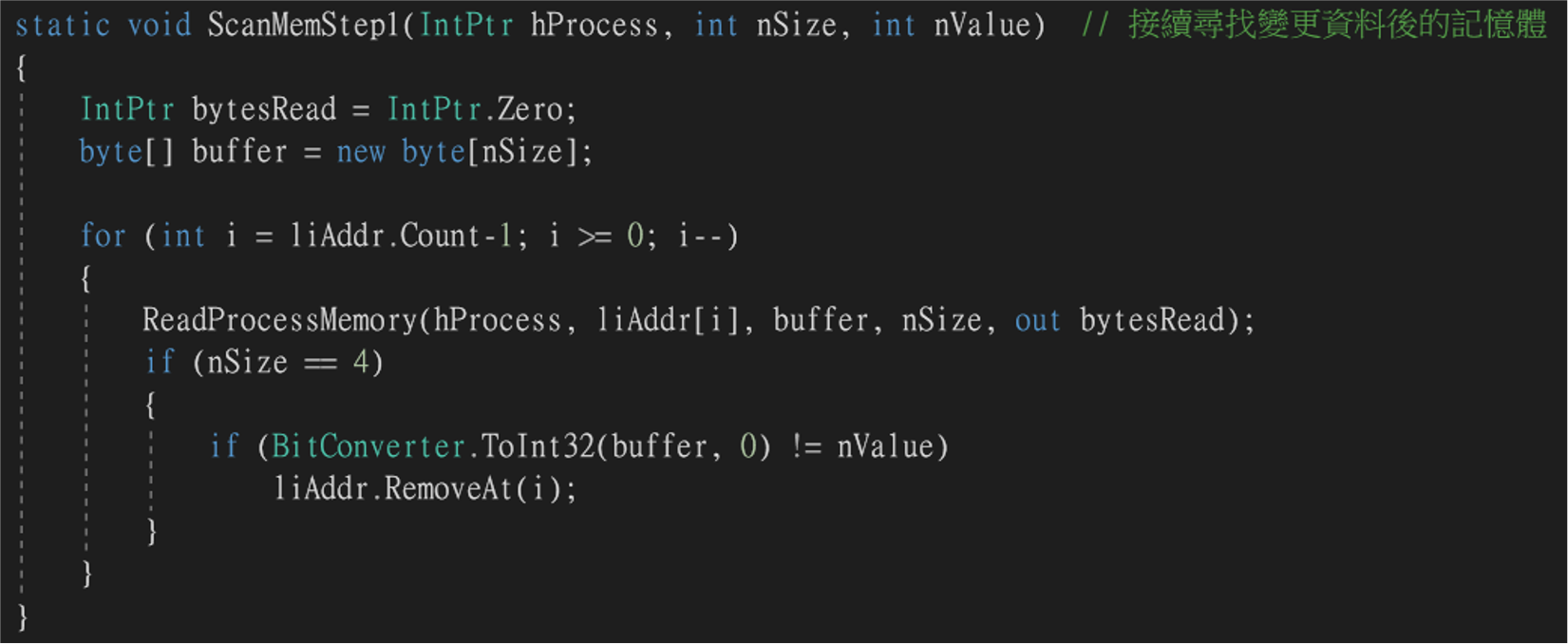
如果條件都成立,使用ReadProcessMemory將整個記憶體區塊內容讀出,並比對數值是否為我們要的,如果是就記錄該記憶體位址

測試程式修改記憶體後,檢查記錄地址的記憶體內容數值是否依然匹配,若不匹配則移除該地址,直到只剩下一個地址

最後我們使用WriteProcessMemoroy去修改測試程式的記憶體數值

C#程式碼

[程式碼] C#修改程式記憶體

 using System;
using System.Collections.Generic;
using System.Linq;
using System.Text;
using System.Runtime.InteropServices;  // DllImport
using System.Diagnostics;  // Process
namespace RwMem
{
    // https://www.pinvoke.net/default.aspx
    public class AdjPriv  // 提升權限
    {
        [StructLayout(LayoutKind.Sequential, Pack = 1)]
        struct TokPriv1Luid
        {
            public int Count;
            public long Luid;
            public int Attr;
        }
        [DllImport("advapi32.dll", ExactSpelling = true, SetLastError = true)]
        static extern bool AdjustTokenPrivileges(IntPtr htok, bool disall, 
            ref TokPriv1Luid newst, int len, IntPtr prev, IntPtr relen);
        [DllImport("kernel32.dll", ExactSpelling = true)]
        static extern IntPtr GetCurrentProcess();
        [DllImport("advapi32.dll", ExactSpelling = true, SetLastError = true)]
        static extern bool OpenProcessToken(IntPtr h, int acc, ref IntPtr phtok);
        [DllImport("advapi32.dll", SetLastError = true)]
        static extern bool LookupPrivilegeValue(string host, string name, ref long pluid);
        const int SE_PRIVILEGE_ENABLED = 0x00000002;
        const int TOKEN_QUERY = 0x00000008;
        const int TOKEN_ADJUST_PRIVILEGES = 0x00000020;
        const string SE_TIME_ZONE_NAMETEXT = "SeTimeZonePrivilege"; //http://msdn.microsoft.com/en-us/library/bb530716(VS.85).aspx
        public bool SetPriv()
        {
            try
            {
                bool retVal;
                TokPriv1Luid tp;
                IntPtr hproc = GetCurrentProcess();
                IntPtr htok = IntPtr.Zero;
                retVal = OpenProcessToken(hproc, TOKEN_ADJUST_PRIVILEGES | TOKEN_QUERY, ref htok);
                tp.Count = 1;
                tp.Luid = 0;
                tp.Attr = SE_PRIVILEGE_ENABLED;
                retVal = LookupPrivilegeValue(null, SE_TIME_ZONE_NAMETEXT, ref tp.Luid);
                retVal = AdjustTokenPrivileges(htok, false, ref tp, 0, IntPtr.Zero, IntPtr.Zero);
                return retVal;
            }
            catch (Exception ex)
            {
                throw;
                return false;
            }
        }
    }
    class Program
    {
        static List<IntPtr> liAddr = new List<IntPtr>();  // 記錄查找到的記憶體位址
        [StructLayout(LayoutKind.Sequential)]
        internal struct SYSTEM_INFO
        {
            internal ushort wProcessorArchitecture;
            internal ushort wReserved;
            internal uint dwPageSize;
            internal IntPtr lpMinimumApplicationAddress;
            internal IntPtr lpMaximumApplicationAddress;
            internal IntPtr dwActiveProcessorMask;
            internal uint dwNumberOfProcessors;
            internal uint dwProcessorType;
            internal uint dwAllocationGranularity;
            internal ushort wProcessorLevel;
            internal ushort wProcessorRevision;
        }
        [DllImport("kernel32.dll", SetLastError = true)]
        static extern void GetSystemInfo(ref SYSTEM_INFO Info);  // 取得系統資訊
        [DllImport("user32.dll", EntryPoint = "FindWindow", SetLastError = true)]
        static extern IntPtr FindWindowByCaption(IntPtr ZeroOnly, string lpWindowName);  // 尋找視窗標題
        [DllImport("user32.dll", SetLastError = true)]
        static extern uint GetWindowThreadProcessId(IntPtr hWnd, out uint lpdwProcessId);  // 取得程序ID
        private enum ProcessAccessTypes
        {
            PROCESS_TERMINATE = 0x00000001,
            PROCESS_CREATE_THREAD = 0x00000002,
            PROCESS_SET_SESSIONID = 0x00000004,
            PROCESS_VM_OPERATION = 0x00000008,
            PROCESS_VM_READ = 0x00000010,
            PROCESS_VM_WRITE = 0x00000020,
            PROCESS_DUP_HANDLE = 0x00000040,
            PROCESS_CREATE_PROCESS = 0x00000080,
            PROCESS_SET_QUOTA = 0x00000100,
            PROCESS_SET_INFORMATION = 0x00000200,
            PROCESS_QUERY_INFORMATION = 0x00000400,
            STANDARD_RIGHTS_REQUIRED = 0x000F0000,
            SYNCHRONIZE = 0x00100000,
            PROCESS_ALL_ACCESS = PROCESS_TERMINATE | PROCESS_CREATE_THREAD | PROCESS_SET_SESSIONID | PROCESS_VM_OPERATION |
              PROCESS_VM_READ | PROCESS_VM_WRITE | PROCESS_DUP_HANDLE | PROCESS_CREATE_PROCESS | PROCESS_SET_QUOTA |
              PROCESS_SET_INFORMATION | PROCESS_QUERY_INFORMATION | STANDARD_RIGHTS_REQUIRED | SYNCHRONIZE
        }
        [DllImport("kernel32.dll", SetLastError = true)]
        public static extern IntPtr OpenProcess(uint processAccess, bool bInheritHandle, int processId);
        [DllImport("kernel32.dll")]
        static extern bool ReadProcessMemory(IntPtr hProcess, IntPtr lpBaseAddress, [Out] byte[] lpBuffer,
            int dwSize, out IntPtr lpNumberOfBytesRead);
        [DllImport("kernel32.dll", SetLastError = true)]
        public static extern bool WriteProcessMemory(IntPtr hProcess, IntPtr lpBaseAddress, byte[] lpBuffer,
            Int32 nSize, out IntPtr lpNumberOfBytesWritten);
        public enum AllocationProtectEnum : uint
        {
            PAGE_EXECUTE = 0x00000010,
            PAGE_EXECUTE_READ = 0x00000020,
            PAGE_EXECUTE_READWRITE = 0x00000040,
            PAGE_EXECUTE_WRITECOPY = 0x00000080,
            PAGE_NOACCESS = 0x00000001,
            PAGE_READONLY = 0x00000002,
            PAGE_READWRITE = 0x00000004,
            PAGE_WRITECOPY = 0x00000008,
            PAGE_GUARD = 0x00000100,
            PAGE_NOCACHE = 0x00000200,
            PAGE_WRITECOMBINE = 0x00000400
        }
        public enum StateEnum : uint
        {
            MEM_COMMIT = 0x1000,
            MEM_FREE = 0x10000,
            MEM_RESERVE = 0x2000
        }
        [StructLayout(LayoutKind.Sequential)]
        public struct MEMORY_BASIC_INFORMATION
        {
            public IntPtr BaseAddress;
            public IntPtr AllocationBase;
            public uint AllocationProtect;
            public IntPtr RegionSize;
            public uint State;
            public uint Protect;
            public uint Type;
        }
        [DllImport("kernel32.dll")]
        static extern int VirtualQueryEx(IntPtr hProcess, IntPtr lpAddress,  // 查詢記憶體資訊
            out MEMORY_BASIC_INFORMATION lpBuffer, uint dwLength);
        static void ScanMemStep0(IntPtr hProcess, int nSize, int nValue)  // 從頭開始尋找記憶體並記錄匹配位址
        {
            SYSTEM_INFO stSysInfo = new SYSTEM_INFO();
            GetSystemInfo(ref stSysInfo);
            MEMORY_BASIC_INFORMATION stMemBasicInfo = new MEMORY_BASIC_INFORMATION();
            UInt64 BaseAddr = (UInt64)stSysInfo.lpMinimumApplicationAddress;
            UInt64 MaxAddr = (UInt64)stSysInfo.lpMaximumApplicationAddress;
            liAddr.Clear();
            while (BaseAddr < MaxAddr)
            {
                VirtualQueryEx(hProcess, (IntPtr)BaseAddr, out stMemBasicInfo, (uint)Marshal.SizeOf(stMemBasicInfo));
                if (stMemBasicInfo.Protect == (uint)AllocationProtectEnum.PAGE_READWRITE &&  // 可讀可寫
                    stMemBasicInfo.State == (uint)StateEnum.MEM_COMMIT)
                {
                    IntPtr bytesRead = IntPtr.Zero;
                    byte[] buffer = new byte[(UInt64)stMemBasicInfo.RegionSize];
                    ReadProcessMemory(hProcess, stMemBasicInfo.BaseAddress, buffer, (int)stMemBasicInfo.RegionSize, out bytesRead);
                    if(nSize == 4)
                    {
                        for (int i = 0; i < (int)stMemBasicInfo.RegionSize; i+=4)
                            if (BitConverter.ToInt32(buffer, i) == nValue)
                                liAddr.Add(stMemBasicInfo.BaseAddress + i);
                    }
                }
                BaseAddr += (UInt64)stMemBasicInfo.RegionSize;
            }
        }

        static void ScanMemStep1(IntPtr hProcess, int nSize, int nValue)  // 接續尋找變更資料後的記憶體
        {
            IntPtr bytesRead = IntPtr.Zero;
            byte[] buffer = new byte[nSize];
            for (int i = liAddr.Count-1; i >= 0; i--)
            {
                ReadProcessMemory(hProcess, liAddr[i], buffer, nSize, out bytesRead);
                if (nSize == 4)
                {
                    if (BitConverter.ToInt32(buffer, 0) != nValue)
                        liAddr.RemoveAt(i);
                }
            }
        }

        static void WriteMem(IntPtr hProcess, int nSize, int nValue)  // 修改記憶體內容
        {
            IntPtr bytesRead = IntPtr.Zero;
            byte[] buffer = BitConverter.GetBytes(nValue);
            if (1 != liAddr.Count)
                return;
            WriteProcessMemory(hProcess, liAddr[0], buffer, nSize, out bytesRead);
        }

        static void Main(string[] args)
        {
            AdjPriv ajdPriv = new AdjPriv();
            ajdPriv.SetPriv();
            IntPtr hWnd = FindWindowByCaption(IntPtr.Zero, "維京碼農");
            if(hWnd != IntPtr.Zero)
            {
                uint dwThreadID = 0;
                GetWindowThreadProcessId(hWnd, out dwThreadID);
                IntPtr hProcess = OpenProcess((uint)(ProcessAccessTypes.PROCESS_QUERY_INFORMATION |
                    ProcessAccessTypes.PROCESS_VM_READ | 
                    ProcessAccessTypes.PROCESS_VM_WRITE),
                    false,
                    (int)dwThreadID);
                while(true)
                {
                    Console.Write("Input Scan Step、Size And Value: ");
                    string str = Console.ReadLine();
                    string[] arrStr = str.Split(' ');
                    if(arrStr[0] == "0")
                    {
                        ScanMemStep0(hProcess, Convert.ToInt32(arrStr[1]), Convert.ToInt32(arrStr[2]));
                        Console.WriteLine("Count Of liAddr = {0}\n", liAddr.Count);
                    }
                    else if(arrStr[0] == "1")
                    {
                        ScanMemStep1(hProcess, Convert.ToInt32(arrStr[1]), Convert.ToInt32(arrStr[2]));
                        Console.WriteLine("Count Of liAddr = {0}\n", liAddr.Count);
                        if(liAddr.Count == 1)
                            Console.WriteLine("Addr Of Value = {0:X}\n", (int)liAddr[0]);
                    }
                    else if(arrStr[0] == "w")
                    {
                        WriteMem(hProcess, Convert.ToInt32(arrStr[1]), Convert.ToInt32(arrStr[2]));
                    }
                    else if (arrStr[0] == "q")
                    {
                        Console.WriteLine("Bye Bye\n", (int)liAddr[0]);
                    }
                }
            }
            else
            {
                Console.WriteLine("App Not Found");
            }
            Console.WriteLine("Press Any Key...");
            Console.ReadKey(true); //Pause
        }
    }
}

2021年3月28日 星期日

[程式碼] 用C#爬出GoodInfo股票資訊

using System;
using System.Collections.Generic;
using System.Linq;
using System.Text;
using System.Threading.Tasks;
using System.IO;
using System.Text.RegularExpressions;
using HtmlAgilityPack;

namespace StockCSharp
{
    class Program
    {
        static string UrlCompanyInfo = "https://goodinfo.tw/StockInfo/StockDetail.asp?STOCK_ID=";
        static string UrlCompanyDividend = "https://goodinfo.tw/StockInfo/StockDividendPolicy.asp?STOCK_ID=";
        static string UrlCompanyProfit = "https://goodinfo.tw/StockInfo/StockBzPerformance.asp?STOCK_ID=";
        static string IdCompany = "3008";
        static string XpathCompanyName = "/html/body/table[2]/tbody/tr/td[3]/table/tbody/tr[2]/td[3]/table[2]/tbody/tr[1]/td[2]";
        static string XpathCompanyIndustry = "/html/body/table[2]/tbody/tr/td[3]/table/tbody/tr[2]/td[3]/table[2]/tbody/tr[2]/td[2]";
        
        static string XpathDividendHeader1 = "/html/body/table[2]/tbody/tr/td[3]/div[2]/div/div/table/thead[1]/tr[1]/td";
        static string XpathDividendHeader = "/html/body/table[2]/tbody/tr/td[3]/div[2]/div/div/table/thead[1]/tr";
        static string XpathDividendData = "/html/body/table[2]/tbody/tr/td[3]/div[2]/div/div/table/tbody[1]/tr";
        static string XpathProfitHeader1 = "/html/body/table[2]/tbody/tr/td[3]/div[2]/div/div/table/thead[1]/tr[1]/td";
        static string XpathProfitHeader = "/html/body/table[2]/tbody/tr/td[3]/div[2]/div/div/table/thead[1]/tr";
        static string XpathProfitData = "/html/body/table[2]/tbody/tr/td[3]/div[2]/div/div/table/tbody[1]/tr";
        // 抓取ID公司名稱與產業別
        static void Get_Company_Info(string strID)
        {
            HtmlDocument doc;
            HtmlNodeCollection nodes;
            HtmlWeb web = new HtmlWeb();
            string CompanyName, CompanyIndustry;
            web.UserAgent = "Mozilla/5.0 (Windows NT 6.3; WOW64; Trident/7.0; rv:11.0) like Gecko";
            web.OverrideEncoding = Encoding.GetEncoding(65001);  // UTF-8
            doc = web.Load(UrlCompanyInfo + strID);
            // 公司名稱
            nodes = doc.DocumentNode.SelectNodes(Regex.Replace(XpathCompanyName, "/tbody([[]\\d[]])?", ""));
            CompanyName = nodes[0].ChildNodes[0].InnerText;
            // 產業別
            nodes = doc.DocumentNode.SelectNodes(Regex.Replace(XpathCompanyIndustry, "/tbody([[]\\d[]])?", ""));
            CompanyIndustry = nodes[0].ChildNodes[0].InnerText;
            Console.WriteLine(CompanyName);
            Console.WriteLine(CompanyIndustry);
        }

        static int Get_Span_Value(HtmlAttributeCollection attr, string span)
        {
            if (attr.Contains(span))
                return  Convert.ToInt32(attr[span].Value);
            else
                return 1;
        }

        // 抓取股利政策
        static List<string[]> Get_Company_Dividend(string strID)
        {
            HtmlDocument doc;
            HtmlNodeCollection nodes;
            HtmlWeb web = new HtmlWeb();
            int i, r, row, rows, c, col, cols, totalCols;
            string[,] ArrHeader2D;
            int[] colData;
            List<string[]> liDividend = new List<string[]>();
            web.UserAgent = "Mozilla/5.0 (Windows NT 6.3; WOW64; Trident/7.0; rv:11.0) like Gecko";
            web.OverrideEncoding = Encoding.GetEncoding(65001);  // UTF-8
            doc = web.Load(UrlCompanyDividend + strID);
            cols = 0;
            nodes = doc.DocumentNode.SelectNodes(Regex.Replace(XpathDividendHeader1, "/tbody([[]\\d[]])?", ""));
            foreach (HtmlNode node in nodes)
                cols += Get_Span_Value(node.Attributes, "colspan");
            totalCols = cols;
            ArrHeader2D = new string[4, totalCols];
            // 計算表格Columns
            i = 0;
            foreach (HtmlNode node in nodes)
            {
                rows = Get_Span_Value(node.Attributes, "rowspan");
                cols = Get_Span_Value(node.Attributes, "colspan");
   
                for (col = 0; col < cols; col++)
                    for (row = 0; row < rows; row++)
                    {
                        ArrHeader2D[row, col + i] = node.InnerText.Replace("\u3000", "").Replace("\xa0", "");
                        ArrHeader2D[row, col + i] = ArrHeader2D[row, col + i].Replace("\n", "").Replace(" ", "");
                    }
                i += cols;
            }
            // 補齊Header內容
            nodes = doc.DocumentNode.SelectNodes(Regex.Replace(XpathDividendHeader, "/tbody([[]\\d[]])?", ""));
            r = 0;
            c = 0;
            foreach (HtmlNode node in nodes)
            {
                if(r != 0)
                {
                    foreach(HtmlNode td in node.ChildNodes)
                    {
                        if (td.Name != "td")
                            continue;
                        rows = Get_Span_Value(td.Attributes, "rowspan");
                        cols = Get_Span_Value(td.Attributes, "colspan");
                        for (col = 0; col < cols; col++)
                            for (row = 0; row < rows; row++)
                            {
                                while (ArrHeader2D[row + r, col + c] != null && ArrHeader2D[row + r, col + c] != "")
                                    c += 1;
                                ArrHeader2D[row+r, col + c] = td.InnerText.Replace("\u3000", "").Replace("\xa0", "");
                                ArrHeader2D[row+r, col + c] = ArrHeader2D[row + r, col + c].Replace("\n", "").Replace(" ", "");
                            }
                        c += cols;
                    }
                }
                r += 1;
                c = 0;
            }
            // 設定想要的欄位內容
            liDividend.Add( new string[]{
                "股利發放年度",
                "合計", "合計", "股利合計",  // 股利
                "最高", "最低", "年均", // 股價
                "現金", "股票", "合計", "EPS(元)",  // 殖利率
                "配息", "配股", "合計",  // 發放率
            });
            // 找出欄位索引值
            colData = new int[liDividend[0].Length];
            for(i=0; i< colData.Length; i++)
            {
                int j = (i == 0) ? 0 : colData[i - 1];
                for(; j< totalCols; j++)
                {
                    if (ArrHeader2D[3, j] == liDividend[0][i])
                    {
                        colData[i] = j;
                        break;
                    }
                }                    
            }
            // 取得表格內容
            nodes = doc.DocumentNode.SelectNodes(Regex.Replace(XpathDividendData, "/tbody([[]\\d[]])?", ""));
            foreach (HtmlNode node in nodes)
            {
                string[] li = new string[liDividend[0].Length];
                List<HtmlNode> tds = new List<HtmlNode>();
                foreach (HtmlNode td in node.ChildNodes)  // 只有td才是我們要的資料
                {
                    if (td.Name == "td")
                        tds.Add(td);
                }
                for (i=0; i< liDividend[0].Length; i++)
                {
                    li[i] = tds[colData[i]].InnerText;
                    if (li[i] == "-")
                        li[i] = "";
                }
                liDividend.Add(li);
            }
            return liDividend;
        }

        // 抓取獲利狀況
        static List<string[]> Get_Company_Profit(string strID)
        {
            HtmlDocument doc;
            HtmlNodeCollection nodes;
            HtmlWeb web = new HtmlWeb();
            int i, r, row, rows, c, col, cols, totalCols;
            string[,] ArrHeader2D;
            int[] colData;
            List<string[]> liProfit = new List<string[]>();
            web.UserAgent = "Mozilla/5.0 (Windows NT 6.3; WOW64; Trident/7.0; rv:11.0) like Gecko";
            web.OverrideEncoding = Encoding.GetEncoding(65001);  // UTF-8
            doc = web.Load(UrlCompanyProfit + strID);
            cols = 0;
            nodes = doc.DocumentNode.SelectNodes(Regex.Replace(XpathProfitHeader1, "/tbody([[]\\d[]])?", ""));
            foreach (HtmlNode node in nodes)
                cols += Get_Span_Value(node.Attributes, "colspan");
            totalCols = cols;
            ArrHeader2D = new string[4, totalCols];
            // 計算表格Columns
            i = 0;
            foreach (HtmlNode node in nodes)
            {
                rows = Get_Span_Value(node.Attributes, "rowspan");
                cols = Get_Span_Value(node.Attributes, "colspan");
                for (col = 0; col < cols; col++)
                    for (row = 0; row < rows; row++)
                    {
                        ArrHeader2D[row, col + i] = node.InnerText.Replace("\u3000", "").Replace("\xa0", "");
                        ArrHeader2D[row, col + i] = ArrHeader2D[row, col + i].Replace("\n", "").Replace(" ", "");
                    }
                i += cols;
            }
            // 補齊Header內容
            nodes = doc.DocumentNode.SelectNodes(Regex.Replace(XpathProfitHeader, "/tbody([[]\\d[]])?", ""));
            r = 0;
            c = 0;
            foreach (HtmlNode node in nodes)
            {
                if (r != 0)
                {
                    foreach (HtmlNode td in node.ChildNodes)
                    {
                        if (td.Name != "td")
                            continue;
                        rows = Get_Span_Value(td.Attributes, "rowspan");
                        cols = Get_Span_Value(td.Attributes, "colspan");
                        for (col = 0; col < cols; col++)
                            for (row = 0; row < rows; row++)
                            {
                                while (ArrHeader2D[row + r, col + c] != null && ArrHeader2D[row + r, col + c] != "")
                                    c += 1;
                                ArrHeader2D[row + r, col + c] = td.InnerText.Replace("\u3000", "").Replace("\xa0", "");
                                ArrHeader2D[row + r, col + c] = ArrHeader2D[row + r, col + c].Replace("\n", "").Replace(" ", "");
                            }
                        c += cols;
                    }
                }
                r += 1;
                c = 0;
            }
            // 設定想要的欄位內容
            liProfit.Add(new string[]{
                "年度", "財報評分",
                "收盤", "平均", "漲跌", "漲跌(%)",  // 股價
                "營業收入", "營業毛利", "稅後淨利", // 獲利金額
                "營業毛利", "稅後淨利",  // 獲利率
                "ROE(%)", "稅後EPS", "年增(元)",
            });
            // 找出欄位索引值
            colData = new int[liProfit[0].Length];
            for (i = 0; i < colData.Length; i++)
            {
                int j = (i == 0) ? 0 : colData[i - 1];
                for (; j < totalCols; j++)
                {
                    if (ArrHeader2D[1, j] == liProfit[0][i])
                    {
                        colData[i] = j;
                        break;
                    }
                }
            }
            // 取得表格內容
            nodes = doc.DocumentNode.SelectNodes(Regex.Replace(XpathProfitData, "/tbody([[]\\d[]])?", ""));
            foreach (HtmlNode node in nodes)
            {
                string[] li = new string[liProfit[0].Length];
                List<HtmlNode> tds = new List<HtmlNode>();
                foreach (HtmlNode td in node.ChildNodes)  // 只有td才是我們要的資料
                {
                    if (td.Name == "td")
                        tds.Add(td);
                }
                for (i = 0; i < liProfit[0].Length; i++)
                {
                    li[i] = tds[colData[i]].InnerText;
                    if (li[i] == "-")
                        li[i] = "";
                }
                liProfit.Add(li);
            }
            return liProfit;
        }

        static void Main(string[] args)
        {
            //Get_Company_Info(IdCompany);
            /*
            List<string[]> liDividend = Get_Company_Dividend(IdCompany);
            foreach(string[] ArrDividend in liDividend)
            {
                for (int i = 0; i < ArrDividend.Length; i++)
                    Console.Write(String.Format("{0}, ", ArrDividend[i]));
                Console.WriteLine("");
            }
            */
            List<string[]> liProfit = Get_Company_Profit(IdCompany);
            foreach (string[] ArrProfit in liProfit)
            {
                for (int i = 0; i < ArrProfit.Length; i++)
                    Console.Write(String.Format("{0}, ", ArrProfit[i]));
                Console.WriteLine("");
            }
            Console.WriteLine("Press Any Key...");
            Console.ReadKey(true); //Pause
        }
    }
}

2021年3月7日 星期日

用C#爬出GoodInfo股票資訊

今天我們要講解的是,如何使用C#+網頁XPath來抓取GoodInfo股票資訊

C#使用的套件為HtmlAgilityPack、與RegularExpressions

HtmlAgilityPack可以幫助我們取得網頁內容與提取資料

與RegularExpressions能夠快速取得或移除字串內容

今天要抓取的標的跟上支影片一樣是大立光,股票代號3008

首先抓取公司名稱與產業別

這邊設定UserAgent,模擬瀏覽器的行為並使用UTF-8編碼,接著使用HtmlWeb.Load取得了網頁內容,抓出公司名稱XPath節點與產業別XPath節點,最後將資料印出


我們接著來抓取股利政策,一樣使用HtmlWeb.Load取得網頁內容


由於表格某些資料佔用不只一欄或一列,所以我們必須手動補齊,避免標頭有空白資料的狀況


再來設定要抓取的資料

最後取得表格的內容

這邊要注意的是,子節點的內容並不是連續的td

因此需要先做一次篩選的動作

最後透過抓取獲利指標來複習一下,第一步就是使用HtmlWeb.Load取得網頁內容

計算資料佔用的欄與列

補齊標頭資料

設定要抓取的資料

最後取得表格內容

一樣要注意,td節點內容才是我們想要的


教學與操作影片

 
Design by Free WordPress Themes | Bloggerized by Lasantha - Premium Blogger Themes | Blogger Templates